> ## Documentation Index
> Fetch the complete documentation index at: https://asymptotelabs-fix-postinstall-refresh-user-hooks.mintlify.site/llms.txt
> Use this file to discover all available pages before exploring further.
# Inventory Local Agent Runtimes
> Inventory local agent runtimes, skills, MCP servers, and Beacon-observable configuration
## Overview
Inventory shows the local AI agent footprint on an endpoint: installed runtimes, local skills, MCP servers, local config files, telemetry hooks, OTLP settings, and recent observed activity.
Use it when you need to answer what is installed, what an agent may be able to access, and whether Beacon has recently observed activity from each runtime.
Inventory explains what is present and observable on the host. [Detections](/detections) evaluate the observed event stream and emit findings when local rules match risky behavior.
## Inventory Areas
Review installed, configured, managed, and observed state for supported agent harnesses.
Review local MCP server configuration and compare expected and unexpected tool access.
Review local skill manifests as an agent extension and configuration surface.
## Setup
Install Beacon and configure endpoint telemetry before running inventory checks:
```bash theme={null}
beacon endpoint install
beacon endpoint status
```
## 1. Run A Basic Inventory
Start with the default inventory view:
```bash title="Inventory local runtimes" theme={null}
beacon endpoint inventory
```
```bash title="Sample output" theme={null}
$ beacon endpoint inventory
Runtime inventory
Claude Code installed configured observed
Codex CLI installed managed observed
Cursor installed hooks: not installed
MCP servers 3 configured
Agent skills 2 discovered
Runtime log ~/.beacon/endpoint/logs/runtime.jsonl
```
## 2. Include All Local Signals
Use `--all` when you want local config files, skill manifests, MCP servers, hooks, OTLP settings, and observed runtime coverage in one report:
```bash title="Show full local inventory" theme={null}
beacon endpoint inventory --all
```
Use `--system` for packaged or MDM-managed installs:
```bash title="Check a system-mode install" theme={null}
sudo beacon endpoint inventory --system --all
```
## 3. Export JSON For Review
Use JSON output for support bundles, scripts, or fleet comparison:
```bash title="Export inventory as JSON" theme={null}
beacon endpoint inventory --json
```
```json title="Sample JSON output" theme={null}
{
"runtimes": [
{
"name": "codex",
"installed": true,
"configured": true,
"managed": true,
"observed": true
}
],
"mcpServers": [
{
"name": "filesystem",
"source": "~/.cursor/mcp.json"
}
]
}
```
## Key Questions Answered
* Which supported agent runtimes are installed or configured on this machine?
* Which local agent skills are present under supported skill roots?
* Which MCP servers are referenced by local agent configuration?
* Which runtime config files can Beacon inspect locally?
* Which hooks, OTLP settings, or launch environment entries are present?
* Which detected runtimes have recently produced Beacon events?
## What To Look For
| Signal | Why it matters |
| ----------------------- | ---------------------------------------------------------------------------------------- |
| Installed runtimes | Shows the local AI tools present on the endpoint. |
| Config files | Identifies where runtime behavior and integrations are defined. |
| Agent skills | Identifies local skill manifests by name/path/hash without retaining instruction bodies. |
| MCP servers | Shows external tools an agent may be able to call. |
| Hooks and OTLP settings | Confirms whether Beacon can collect telemetry. |
| Managed state | Distinguishes Beacon-managed collection from customer-managed config. |
| Observed events | Confirms the runtime has recently emitted Beacon telemetry. |
Inventory reads local endpoint state only. It does not authenticate to remote SaaS accounts, skill marketplaces, or MCP servers.
## View Results
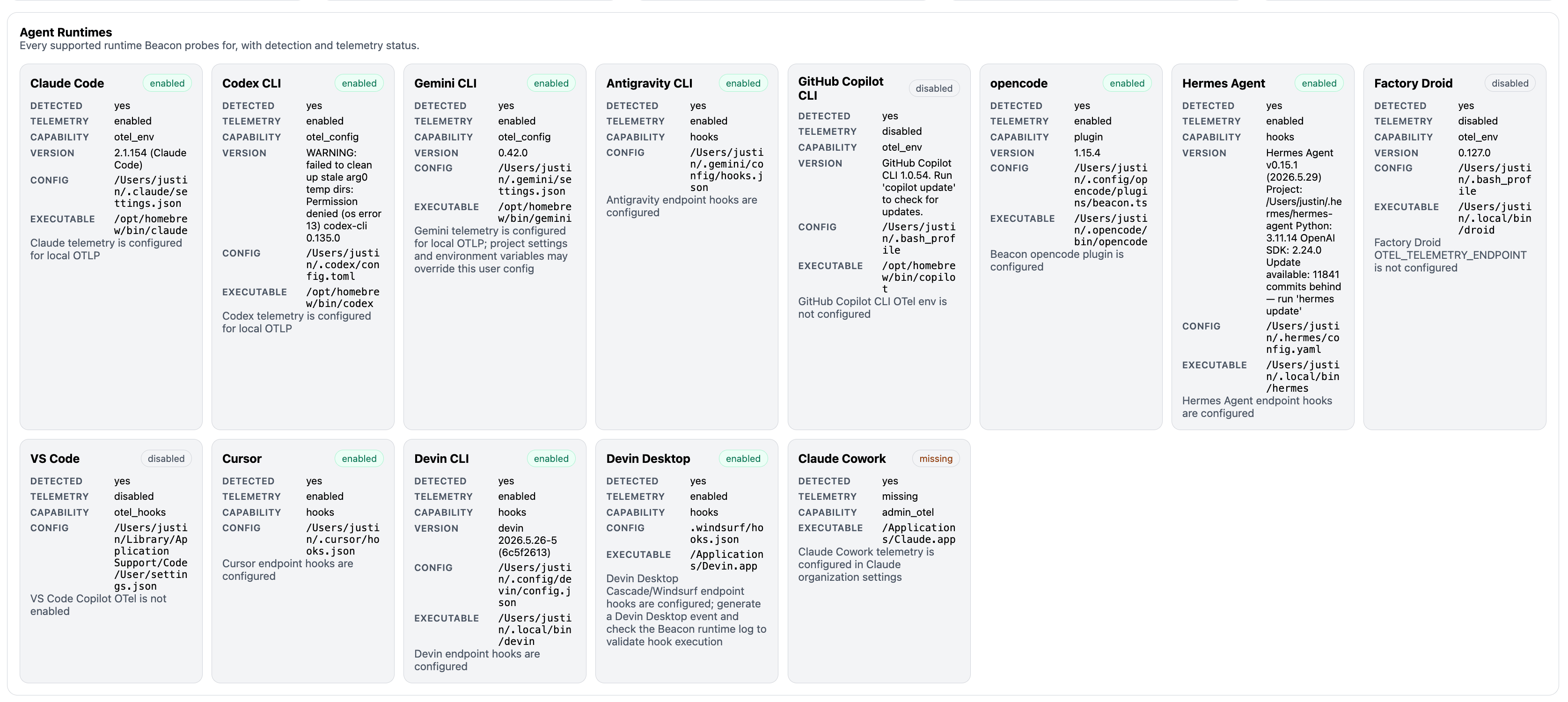 ### Runtime Coverage States
* **Installed:** the runtime or executable appears to be present locally.
* **Configured:** Beacon can see telemetry settings, hooks, launch environment entries, or other local config for the runtime.
* **Managed:** the detected telemetry surface appears to be configured by Beacon.
* **Observed:** recent Beacon events in the runtime log reference the runtime.
A runtime can be installed but not configured, configured but not observed, or observed only in a different user-mode or system-mode log.
### MCP Servers And Configs
Use MCP inventory to spot tool exposure from local agent configs:
* Expected MCP servers missing after deployment
* Unexpected MCP servers on sensitive endpoints
* Server references introduced by a specific runtime config
* User-mode versus system-mode config differences
### Agent Skills
Use skill inventory to spot durable local instruction surfaces:
* Expected skill packs missing after workstation setup
* Unexpected local skills on sensitive endpoints
* User-scope versus project-scope skill differences
* Recent skill manifest changes through file hash and modified-time metadata
Beacon reports skill names, paths, hashes, scope, and parser status. It does not retain `SKILL.md` instruction bodies in inventory output or inventory events.
## 4. Open Dashboard Inventory
Open the dashboard for a quick visual check alongside top harnesses, models, repositories, MCP servers, and risk signals:
```bash title="Open the dashboard" theme={null}
beacon endpoint dashboard --open
```
## Key Features Demonstrated
* Local runtime discovery without remote SaaS authentication.
* Skill, MCP server, and config inventory from supported local paths.
* Coverage state comparison across installed, configured, managed, and observed runtimes.
* Dashboard handoff for visual review.
## Troubleshooting
Check whether:
* The runtime is installed on the endpoint
* Beacon can detect the runtime or its configuration file
* The skill exists under a supported one-level skill root with a `SKILL.md` manifest
* The MCP server is defined in a supported local config path
* Hooks, OTLP settings, or launch environment entries are configured for that runtime
* User mode or system mode is reading the config and runtime log you expect
* Recent events exist in the active runtime log or a rotated archive
## Related
Review common Beacon workflows for local agent runtime visibility.
Collect, inspect, and forward normalized telemetry from local agent runtimes.
Open the local dashboard and review Security Overview.
Review flags, examples, and JSON output behavior.
Discover supported local agent harnesses and telemetry state.
Review runtime coverage and endpoint event fields Beacon can write.
### Runtime Coverage States
* **Installed:** the runtime or executable appears to be present locally.
* **Configured:** Beacon can see telemetry settings, hooks, launch environment entries, or other local config for the runtime.
* **Managed:** the detected telemetry surface appears to be configured by Beacon.
* **Observed:** recent Beacon events in the runtime log reference the runtime.
A runtime can be installed but not configured, configured but not observed, or observed only in a different user-mode or system-mode log.
### MCP Servers And Configs
Use MCP inventory to spot tool exposure from local agent configs:
* Expected MCP servers missing after deployment
* Unexpected MCP servers on sensitive endpoints
* Server references introduced by a specific runtime config
* User-mode versus system-mode config differences
### Agent Skills
Use skill inventory to spot durable local instruction surfaces:
* Expected skill packs missing after workstation setup
* Unexpected local skills on sensitive endpoints
* User-scope versus project-scope skill differences
* Recent skill manifest changes through file hash and modified-time metadata
Beacon reports skill names, paths, hashes, scope, and parser status. It does not retain `SKILL.md` instruction bodies in inventory output or inventory events.
## 4. Open Dashboard Inventory
Open the dashboard for a quick visual check alongside top harnesses, models, repositories, MCP servers, and risk signals:
```bash title="Open the dashboard" theme={null}
beacon endpoint dashboard --open
```
## Key Features Demonstrated
* Local runtime discovery without remote SaaS authentication.
* Skill, MCP server, and config inventory from supported local paths.
* Coverage state comparison across installed, configured, managed, and observed runtimes.
* Dashboard handoff for visual review.
## Troubleshooting
Check whether:
* The runtime is installed on the endpoint
* Beacon can detect the runtime or its configuration file
* The skill exists under a supported one-level skill root with a `SKILL.md` manifest
* The MCP server is defined in a supported local config path
* Hooks, OTLP settings, or launch environment entries are configured for that runtime
* User mode or system mode is reading the config and runtime log you expect
* Recent events exist in the active runtime log or a rotated archive
## Related
Review common Beacon workflows for local agent runtime visibility.
Collect, inspect, and forward normalized telemetry from local agent runtimes.
Open the local dashboard and review Security Overview.
Review flags, examples, and JSON output behavior.
Discover supported local agent harnesses and telemetry state.
Review runtime coverage and endpoint event fields Beacon can write.