> ## Documentation Index
> Fetch the complete documentation index at: https://asymptotelabs-fix-postinstall-refresh-user-hooks.mintlify.site/llms.txt
> Use this file to discover all available pages before exploring further.
# MCP Server Inventory
> Review local MCP server configuration and expected tool exposure
## Overview
MCP server inventory helps explain which local agent configuration files reference Model Context Protocol servers and where those references came from.
Use it to review the tool surface an agent may be able to call from local configuration:
* Expected MCP servers that should be present after workstation setup.
* Unexpected MCP servers on sensitive endpoints or repositories.
* Server references introduced by user-level, project-level, or runtime-specific config.
* User-mode versus system-mode differences when Beacon reads different endpoint paths and runtime logs.
Inventory reads local config and runtime state only. It does not authenticate to MCP servers, call their tools, or verify remote service permissions. For Claude Code, user-scoped MCP servers are commonly stored in `~/.claude.json`; project-scoped servers may also appear in project MCP/config files. For Cursor, Beacon inspects user and project `mcp.json` files.
## Run MCP Inventory
Start with the full inventory report when reviewing MCP server configuration alongside harness and skill state:
```bash title="Show MCP server inventory" theme={null}
beacon endpoint inventory --all
```
Use JSON output when comparing endpoints or attaching inventory to a support bundle:
```bash title="Export MCP server inventory" theme={null}
beacon endpoint inventory --json
```
Use system mode when the endpoint service and configuration are installed under system paths:
```bash title="Review system-mode inventory" theme={null}
sudo beacon endpoint inventory --system --all
```
## Expected Versus Unexpected Servers
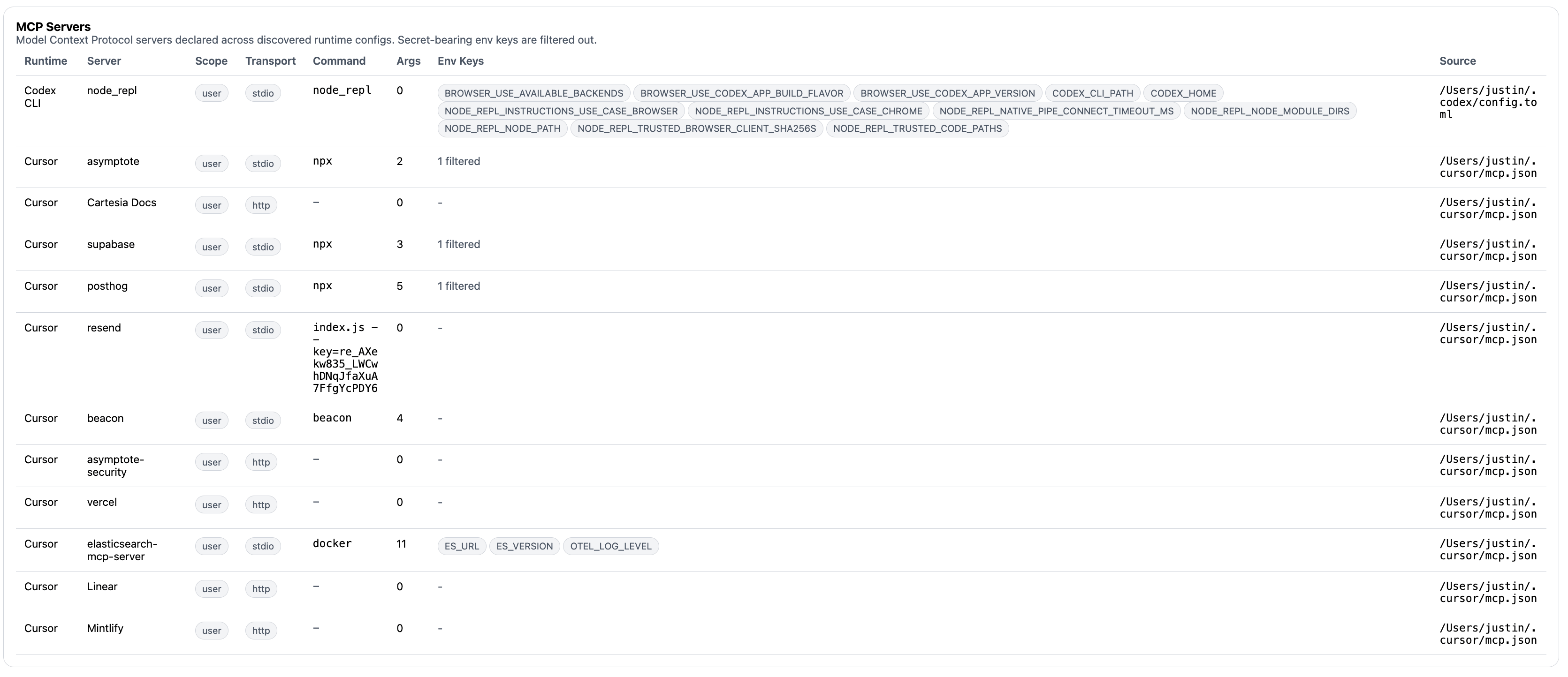 Treat MCP inventory as a local configuration review. For each server, compare the reported name, source path, scope, and runtime context with the server list your team expects.
Common review questions:
* Is the server expected for this user, repository, or managed workstation profile?
* Did the server come from a user config or a project config that may travel with source code?
* Does the server expose filesystem, shell, browser, ticketing, messaging, or credential-adjacent tools?
* Is the server present in config but absent from recent observed activity?
* Are there recent `mcp` endpoint events that show the server or tool being used?
Beacon detections can evaluate emitted runtime telemetry when supported harnesses report MCP-like tool activity. Inventory explains that a server is configured or observable; detections evaluate the event stream when activity occurs.
## Beacon MCP Is Separate
The `beacon mcp` command group exposes local Beacon activity to MCP clients. That is different from inventorying third-party MCP servers referenced by agent configs.
Use `beacon mcp doctor` to validate Beacon's own local MCP server before connecting a client:
```bash title="Validate Beacon MCP" theme={null}
beacon mcp doctor
```
Beacon MCP reads the local runtime log and should stay on stdio or loopback HTTP. It does not require a hosted Beacon account.
## Related
Return to the Inventory landing page and command walkthrough.
Review inventory flags and JSON output behavior.
Review Beacon's local MCP command group.
Validate local Beacon MCP setup.
Connect Cursor or Claude Code to Beacon MCP for local testing.
Treat MCP inventory as a local configuration review. For each server, compare the reported name, source path, scope, and runtime context with the server list your team expects.
Common review questions:
* Is the server expected for this user, repository, or managed workstation profile?
* Did the server come from a user config or a project config that may travel with source code?
* Does the server expose filesystem, shell, browser, ticketing, messaging, or credential-adjacent tools?
* Is the server present in config but absent from recent observed activity?
* Are there recent `mcp` endpoint events that show the server or tool being used?
Beacon detections can evaluate emitted runtime telemetry when supported harnesses report MCP-like tool activity. Inventory explains that a server is configured or observable; detections evaluate the event stream when activity occurs.
## Beacon MCP Is Separate
The `beacon mcp` command group exposes local Beacon activity to MCP clients. That is different from inventorying third-party MCP servers referenced by agent configs.
Use `beacon mcp doctor` to validate Beacon's own local MCP server before connecting a client:
```bash title="Validate Beacon MCP" theme={null}
beacon mcp doctor
```
Beacon MCP reads the local runtime log and should stay on stdio or loopback HTTP. It does not require a hosted Beacon account.
## Related
Return to the Inventory landing page and command walkthrough.
Review inventory flags and JSON output behavior.
Review Beacon's local MCP command group.
Validate local Beacon MCP setup.
Connect Cursor or Claude Code to Beacon MCP for local testing.