> ## Documentation Index
> Fetch the complete documentation index at: https://asymptotelabs-fix-postinstall-refresh-user-hooks.mintlify.site/llms.txt
> Use this file to discover all available pages before exploring further.
# Skills Inventory
> Review local agent skills as an extension and configuration surface
## Overview
Skills are a local agent extension and configuration surface. A skill can add durable instructions, scripts, workflows, or tool guidance that changes how an agent behaves when the runtime loads it.
Beacon inventory can help identify local skill manifests under supported skill roots. It follows symlinked skill directories, which is common for Claude Code skills linked from a shared `.agents/skills` store. It reports metadata such as names, paths, hashes, scope, modified time, and parser status. It does not retain `SKILL.md` instruction bodies in inventory output, dashboard responses, or inventory events.
## What Inventory Can Infer Today
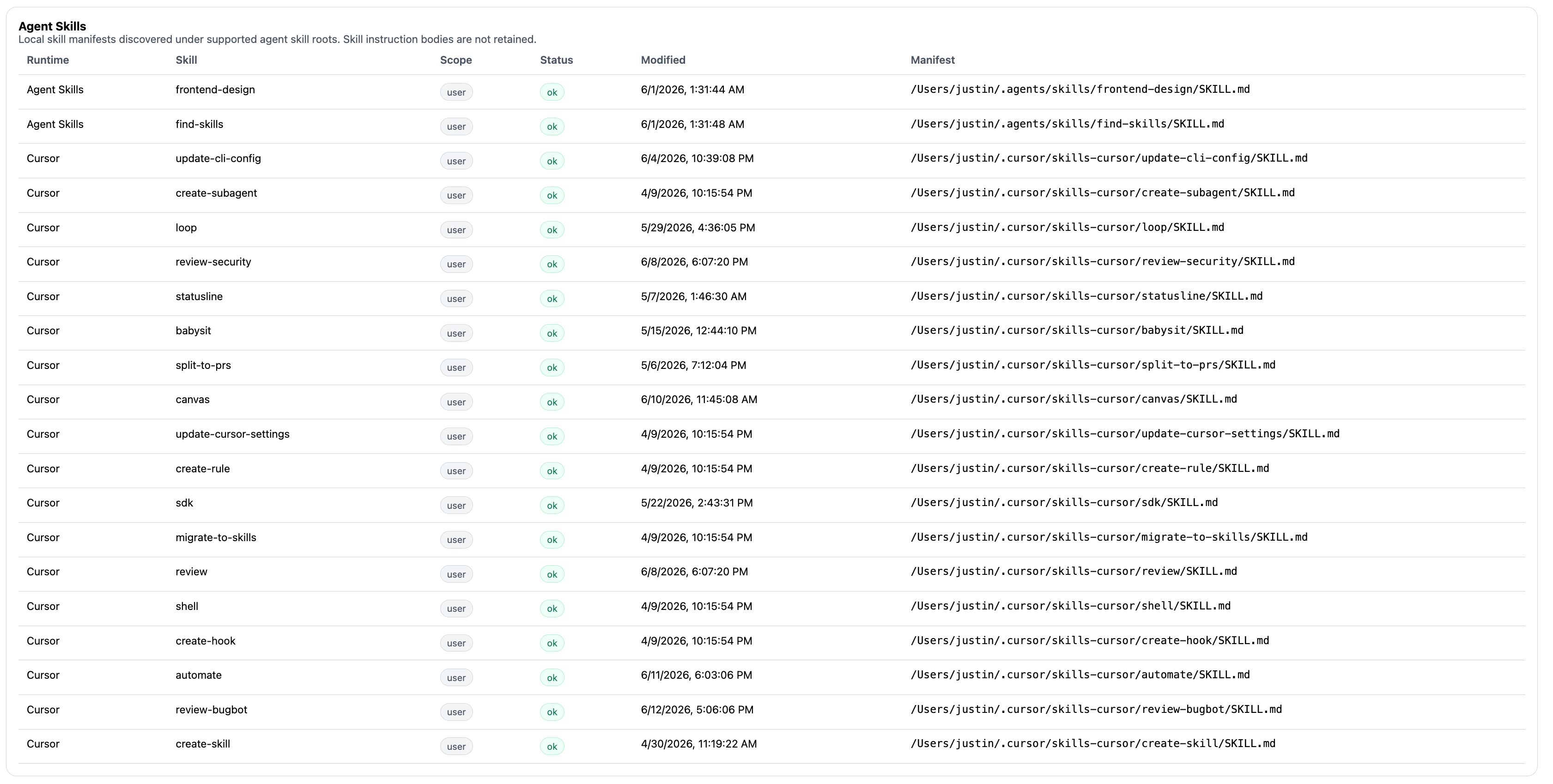 Use `beacon endpoint inventory --all` to review skill metadata alongside harness, MCP server, hook, and config state:
```bash title="Show skill inventory" theme={null}
beacon endpoint inventory --all
```
For machine-readable review, export JSON:
```bash title="Export skill metadata" theme={null}
beacon endpoint inventory --json
```
Skill inventory is useful for:
* Confirming expected local skill packs are present after workstation setup.
* Spotting unexpected skills on sensitive endpoints or repositories.
* Comparing user-scope and project-scope skill roots.
* Detecting manifest changes through hashes and modified-time metadata.
* Identifying parser failures that may prevent Beacon from understanding a manifest consistently.
## What To Review Manually
Inventory is intentionally conservative. It can identify local skill manifests and change indicators, but reviewers should inspect the skill contents, scripts, and repository context when deciding whether a skill is expected.
Manual review should cover:
* What instructions the skill gives the agent.
* Whether the skill references local scripts, tools, shell commands, or external services.
* Whether the skill is user-specific, project-specific, or checked into source control.
* Whether the manifest hash changed at an expected time.
* Whether the owning team recognizes the skill name and path.
Beacon does not claim to authenticate to or fully enumerate remote skill registries. Treat inventory as local endpoint visibility into supported paths, not as a registry audit.
## Runtime Telemetry And Detections
Skills may influence later runtime behavior. When a supported harness emits telemetry for tool calls, commands, file activity, approvals, or MCP-like tool usage, Beacon normalizes those events into the runtime log.
[Detections](/detections) can evaluate that observed event stream. For example, a finding may be based on a command, file path, MCP server, approval decision, or tool call that occurred while an agent was using a skill-guided workflow. Inventory helps explain the local skill surface; detections evaluate what the agent actually did when telemetry was emitted.
## Related
Return to the Inventory landing page and command walkthrough.
Review inventory flags, filtering, and JSON output.
Understand how rules evaluate observed endpoint events.
Review endpoint event data and inventory metadata behavior.
Use `beacon endpoint inventory --all` to review skill metadata alongside harness, MCP server, hook, and config state:
```bash title="Show skill inventory" theme={null}
beacon endpoint inventory --all
```
For machine-readable review, export JSON:
```bash title="Export skill metadata" theme={null}
beacon endpoint inventory --json
```
Skill inventory is useful for:
* Confirming expected local skill packs are present after workstation setup.
* Spotting unexpected skills on sensitive endpoints or repositories.
* Comparing user-scope and project-scope skill roots.
* Detecting manifest changes through hashes and modified-time metadata.
* Identifying parser failures that may prevent Beacon from understanding a manifest consistently.
## What To Review Manually
Inventory is intentionally conservative. It can identify local skill manifests and change indicators, but reviewers should inspect the skill contents, scripts, and repository context when deciding whether a skill is expected.
Manual review should cover:
* What instructions the skill gives the agent.
* Whether the skill references local scripts, tools, shell commands, or external services.
* Whether the skill is user-specific, project-specific, or checked into source control.
* Whether the manifest hash changed at an expected time.
* Whether the owning team recognizes the skill name and path.
Beacon does not claim to authenticate to or fully enumerate remote skill registries. Treat inventory as local endpoint visibility into supported paths, not as a registry audit.
## Runtime Telemetry And Detections
Skills may influence later runtime behavior. When a supported harness emits telemetry for tool calls, commands, file activity, approvals, or MCP-like tool usage, Beacon normalizes those events into the runtime log.
[Detections](/detections) can evaluate that observed event stream. For example, a finding may be based on a command, file path, MCP server, approval decision, or tool call that occurred while an agent was using a skill-guided workflow. Inventory helps explain the local skill surface; detections evaluate what the agent actually did when telemetry was emitted.
## Related
Return to the Inventory landing page and command walkthrough.
Review inventory flags, filtering, and JSON output.
Understand how rules evaluate observed endpoint events.
Review endpoint event data and inventory metadata behavior.