> ## Documentation Index
> Fetch the complete documentation index at: https://asymptotelabs-fix-postinstall-refresh-user-hooks.mintlify.site/llms.txt
> Use this file to discover all available pages before exploring further.
# Claude Code Cloud Agents
> Capture Claude Code cloud agent telemetry and forward cloud-agent runtime logs to customer-managed Google Cloud Storage
## Integration Overview
Use this integration to capture Claude Code cloud-agent activity and upload each
session log to your own Google Cloud Storage bucket. It is meant for testing
cloud-agent telemetry without running a hosted Asymptote backend.
This flow depends on the Beacon CLI. You run `beacon cloud` commands from your
workstation to create the GCS upload path, print Claude environment variables,
and generate the setup script that runs inside the Claude cloud sandbox.
If you're interested in leveraging this telemetry ingest across your
enterprise, [Asymptote Managed](/deployment/managed) is designed for
production cloud-agent telemetry ingest at scale.
## Overview
Claude Code Cloud Agents run in Anthropic's cloud environment, so Beacon cannot
use the long-running endpoint agent that local installs use. Instead, the setup
script installs Beacon hooks inside the sandbox. During a cloud-agent session,
those hooks write `/tmp/beacon/runtime.jsonl`; at the end of the session, Beacon
uploads that file to GCS.
```mermaid theme={null}
flowchart LR
ClaudeWeb["Claude Code Cloud Agents"] --> Hooks["Beacon hooks in sandbox"]
Hooks --> RuntimeLog["/tmp/beacon/runtime.jsonl"]
RuntimeLog --> GCS["Customer-managed GCS bucket"]
```
The setup has three parts:
1. Create a dedicated GCS bucket and uploader service account with Beacon.
2. Add Beacon cloud telemetry environment variables to the Claude Code cloud environment.
3. Paste a Beacon-generated setup script into the Claude cloud environment.
Each Claude Code cloud agent session writes one readable JSONL object:
```text theme={null}
gs:////provider=claude_code_web/user_id=/run_id=/runtime.jsonl
```
## Prerequisites
* Beacon CLI `v0.0.51` or later.
* `gcloud` installed and authenticated to the Google Cloud project you will use
for telemetry storage.
* A Google Cloud project where you can create buckets, service accounts, IAM
bindings, and service account keys.
* Claude Code cloud agent access for the repository you want to test.
* A Claude cloud environment with outbound access to:
* `oauth2.googleapis.com`
* `storage.googleapis.com`
* `github.com`
* `*.githubusercontent.com`
Install or upgrade Beacon before you start:
```bash theme={null}
brew tap asymptote-labs/tap
brew install beacon
brew upgrade beacon
beacon version
```
Authenticate `gcloud` and select your project:
```bash theme={null}
gcloud auth login
gcloud config set project
```
## 1. Create the GCS Upload Path
From your workstation, choose a bucket and prefix:
```bash theme={null}
export GCP_PROJECT="your-gcp-project"
export BEACON_TEST_BUCKET="your-beacon-cloud-agent-traces"
export BEACON_CLOUD_GCS_PREFIX="agent-traces/customer=my-team"
```
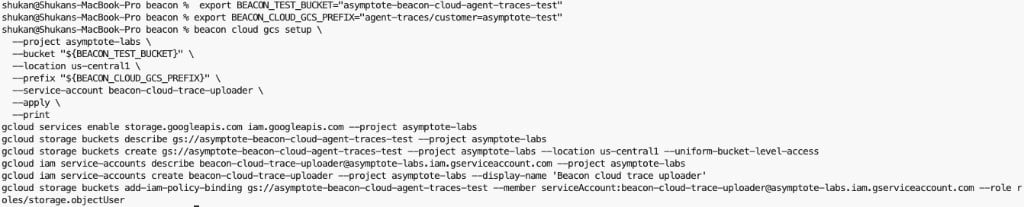
Review the GCP changes Beacon will make:
```bash theme={null}
beacon cloud gcs setup \
--project "$GCP_PROJECT" \
--bucket "$BEACON_TEST_BUCKET" \
--location us-central1 \
--prefix "$BEACON_CLOUD_GCS_PREFIX" \
--service-account beacon-cloud-trace-uploader \
--print
```
 Apply the setup and print the Claude environment variables:
```bash theme={null}
beacon cloud gcs setup \
--project "$GCP_PROJECT" \
--bucket "$BEACON_TEST_BUCKET" \
--location us-central1 \
--prefix "$BEACON_CLOUD_GCS_PREFIX" \
--service-account beacon-cloud-trace-uploader \
--apply \
--print-env
```
Copy the printed values. Redact `BEACON_CLOUD_GCS_CREDENTIALS_B64` anywhere you
share screenshots or logs.
Apply the setup and print the Claude environment variables:
```bash theme={null}
beacon cloud gcs setup \
--project "$GCP_PROJECT" \
--bucket "$BEACON_TEST_BUCKET" \
--location us-central1 \
--prefix "$BEACON_CLOUD_GCS_PREFIX" \
--service-account beacon-cloud-trace-uploader \
--apply \
--print-env
```
Copy the printed values. Redact `BEACON_CLOUD_GCS_CREDENTIALS_B64` anywhere you
share screenshots or logs.
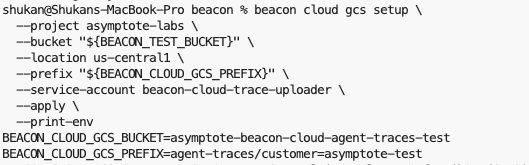 The helper creates a dedicated uploader service account and grants it object
upload access to the selected bucket.
## 2. Configure Claude Code Cloud Agents
Open the Claude Code web application and select the cloud environment for your
repository.
The helper creates a dedicated uploader service account and grants it object
upload access to the selected bucket.
## 2. Configure Claude Code Cloud Agents
Open the Claude Code web application and select the cloud environment for your
repository.
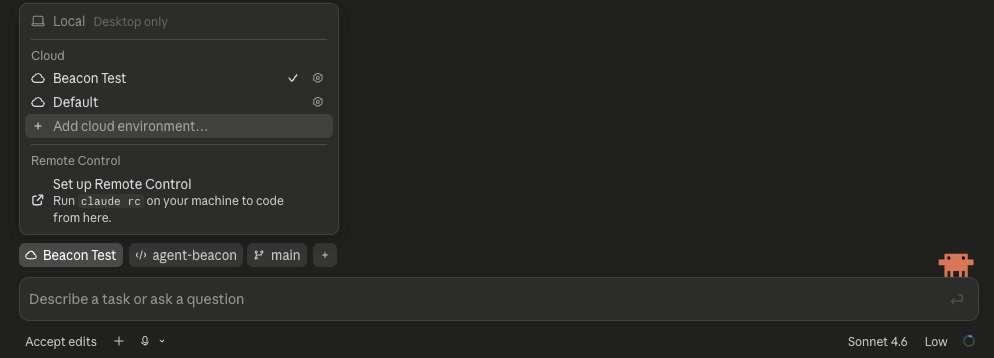 Set network access to **Custom** and allow:
```text theme={null}
oauth2.googleapis.com
storage.googleapis.com
github.com
*.githubusercontent.com
```
Add these environment variables:
```bash theme={null}
BEACON_ORIGIN=cloud
BEACON_RUN_PROVIDER=claude_code_web
BEACON_RUN_EPHEMERAL=true
BEACON_CLOUD_USER_ID_HASH=
BEACON_CLOUD_GCS_BUCKET=
BEACON_CLOUD_GCS_PREFIX=
BEACON_CLOUD_GCS_CREDENTIALS_B64=
```
Set network access to **Custom** and allow:
```text theme={null}
oauth2.googleapis.com
storage.googleapis.com
github.com
*.githubusercontent.com
```
Add these environment variables:
```bash theme={null}
BEACON_ORIGIN=cloud
BEACON_RUN_PROVIDER=claude_code_web
BEACON_RUN_EPHEMERAL=true
BEACON_CLOUD_USER_ID_HASH=
BEACON_CLOUD_GCS_BUCKET=
BEACON_CLOUD_GCS_PREFIX=
BEACON_CLOUD_GCS_CREDENTIALS_B64=
```
 ## 3. Add the Setup Script
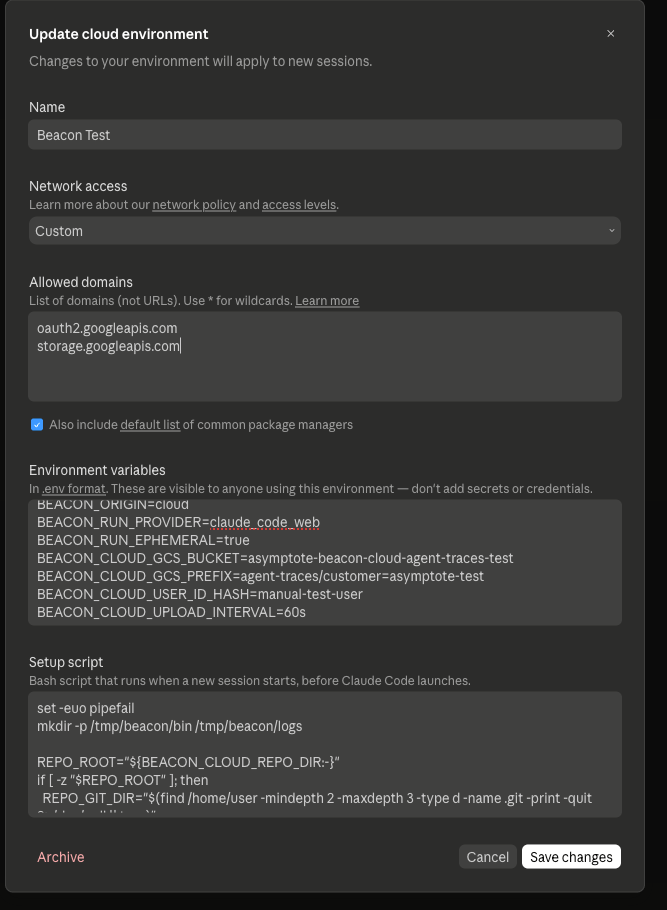
Generate the setup script for your Beacon release:
```bash theme={null}
beacon cloud claude-web print-setup --version v0.0.66
```
Paste the generated script into the Claude environment **Setup script** field.
The script:
* installs `beacon` and `beacon-hooks` in `/tmp/beacon/bin`,
* finds the cloud sandbox repository root,
* writes `.claude/settings.local.json` inside the sandbox clone,
* excludes generated Claude settings from git commits.
If you are testing unreleased Beacon changes from a branch, build `beacon` and
`beacon-hooks` from that branch in the setup script instead of using
`print-setup --version`.
## 4. Run a Cloud Agent Task
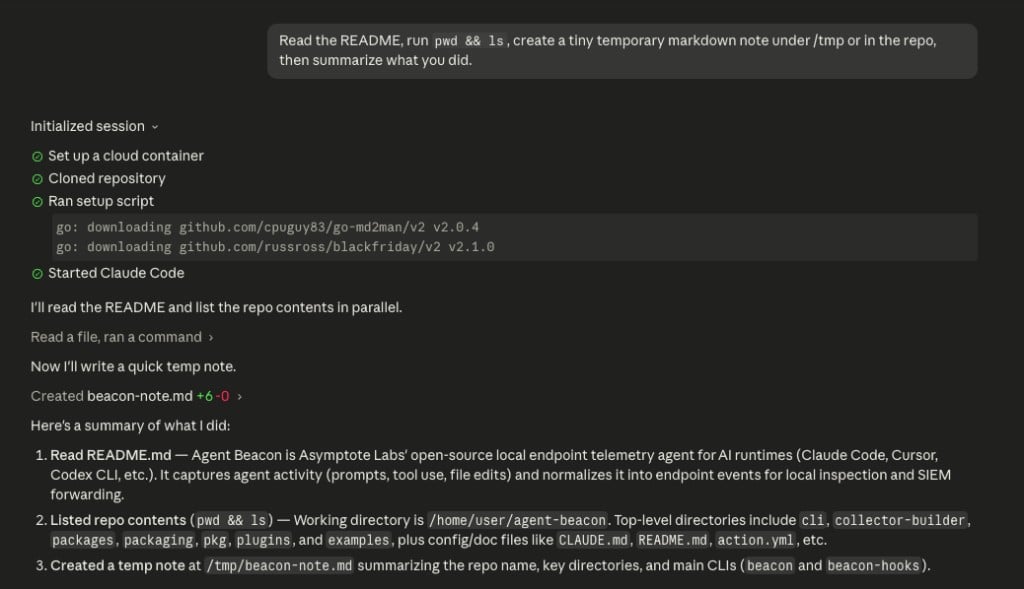
Start a Claude Code cloud agent task that uses tools. You can start the task
from the Claude app on your phone or from the Claude Code web application. For
example:
```text theme={null}
Read the README, run pwd && ls, create a tiny temporary markdown note under /tmp or in the repo, then summarize what you did.
```
## 3. Add the Setup Script
Generate the setup script for your Beacon release:
```bash theme={null}
beacon cloud claude-web print-setup --version v0.0.66
```
Paste the generated script into the Claude environment **Setup script** field.
The script:
* installs `beacon` and `beacon-hooks` in `/tmp/beacon/bin`,
* finds the cloud sandbox repository root,
* writes `.claude/settings.local.json` inside the sandbox clone,
* excludes generated Claude settings from git commits.
If you are testing unreleased Beacon changes from a branch, build `beacon` and
`beacon-hooks` from that branch in the setup script instead of using
`print-setup --version`.
## 4. Run a Cloud Agent Task
Start a Claude Code cloud agent task that uses tools. You can start the task
from the Claude app on your phone or from the Claude Code web application. For
example:
```text theme={null}
Read the README, run pwd && ls, create a tiny temporary markdown note under /tmp or in the repo, then summarize what you did.
```
 ## 5. Verify GCS Upload
List the uploaded session objects:
```bash theme={null}
gcloud storage ls --recursive "gs://${BEACON_TEST_BUCKET}/${BEACON_CLOUD_GCS_PREFIX}/"
```
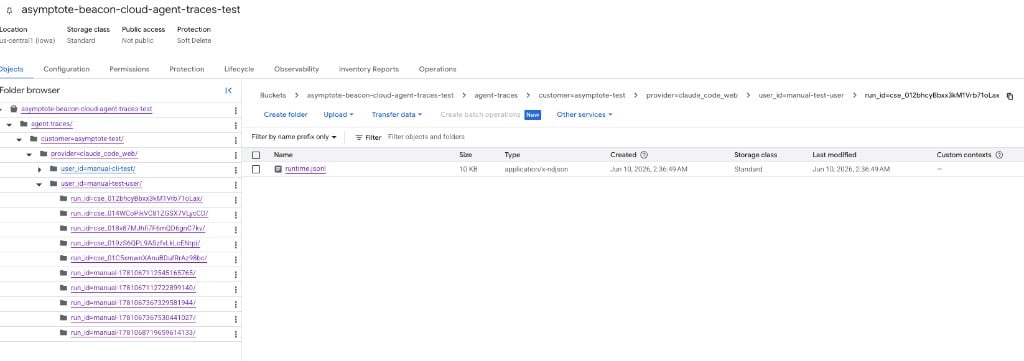
You should see a path like:
```text theme={null}
provider=claude_code_web/user_id=/run_id=cse_.../runtime.jsonl
```
## 5. Verify GCS Upload
List the uploaded session objects:
```bash theme={null}
gcloud storage ls --recursive "gs://${BEACON_TEST_BUCKET}/${BEACON_CLOUD_GCS_PREFIX}/"
```
You should see a path like:
```text theme={null}
provider=claude_code_web/user_id=/run_id=cse_.../runtime.jsonl
```
 Inspect the log:
```bash theme={null}
gcloud storage cat "gs://${BEACON_TEST_BUCKET}/${BEACON_CLOUD_GCS_PREFIX}/provider=claude_code_web/user_id=/run_id=/runtime.jsonl" | head
```
Expected fields include:
```text theme={null}
vendor=beacon
product=endpoint-agent
schema_version=1.0
origin=cloud
harness.name=claude
run.provider=claude_code_web
run.run_id=cse_...
```
## Security Note
The self-serve GCS flow above creates a dedicated service account scoped to
object uploads for one bucket, then stores its credentials in the Claude Code
environment. This is useful for proof-of-concept testing, but treat that
environment variable as a sensitive credential.
Claude notes that cloud environment variables are visible to users of that
environment and recommends avoiding secrets there when possible. Avoid broad
credentials and review access before using this flow with sensitive telemetry.
## Troubleshooting
### The bucket is empty
Confirm the Claude setup script ran and generated hooks:
```bash theme={null}
ls -la .claude
sed -n '1,120p' .claude/settings.local.json
```
Confirm hooks wrote telemetry:
```bash theme={null}
ls -l /tmp/beacon/runtime.jsonl
head /tmp/beacon/runtime.jsonl
```
If `runtime.jsonl` exists but GCS is empty, check network access and GCS
credentials. The cloud sandbox must reach both `oauth2.googleapis.com` and
`storage.googleapis.com`.
### Claude tries to commit hook settings
The setup script should write `.claude/settings.local.json`, not
`.claude/settings.json`. `settings.local.json` is intended for local or
sandbox-specific configuration and should stay out of commits.
## Related
Review local Claude Code telemetry through OTLP and hooks.
Review local endpoint GCS forwarding for persistent endpoint deployments.
Use managed secure ingest for production enterprise cloud-agent telemetry.
Request new cloud-agent destinations or contribute support.
Inspect the log:
```bash theme={null}
gcloud storage cat "gs://${BEACON_TEST_BUCKET}/${BEACON_CLOUD_GCS_PREFIX}/provider=claude_code_web/user_id=/run_id=/runtime.jsonl" | head
```
Expected fields include:
```text theme={null}
vendor=beacon
product=endpoint-agent
schema_version=1.0
origin=cloud
harness.name=claude
run.provider=claude_code_web
run.run_id=cse_...
```
## Security Note
The self-serve GCS flow above creates a dedicated service account scoped to
object uploads for one bucket, then stores its credentials in the Claude Code
environment. This is useful for proof-of-concept testing, but treat that
environment variable as a sensitive credential.
Claude notes that cloud environment variables are visible to users of that
environment and recommends avoiding secrets there when possible. Avoid broad
credentials and review access before using this flow with sensitive telemetry.
## Troubleshooting
### The bucket is empty
Confirm the Claude setup script ran and generated hooks:
```bash theme={null}
ls -la .claude
sed -n '1,120p' .claude/settings.local.json
```
Confirm hooks wrote telemetry:
```bash theme={null}
ls -l /tmp/beacon/runtime.jsonl
head /tmp/beacon/runtime.jsonl
```
If `runtime.jsonl` exists but GCS is empty, check network access and GCS
credentials. The cloud sandbox must reach both `oauth2.googleapis.com` and
`storage.googleapis.com`.
### Claude tries to commit hook settings
The setup script should write `.claude/settings.local.json`, not
`.claude/settings.json`. `settings.local.json` is intended for local or
sandbox-specific configuration and should stay out of commits.
## Related
Review local Claude Code telemetry through OTLP and hooks.
Review local endpoint GCS forwarding for persistent endpoint deployments.
Use managed secure ingest for production enterprise cloud-agent telemetry.
Request new cloud-agent destinations or contribute support.